Lucid
School project
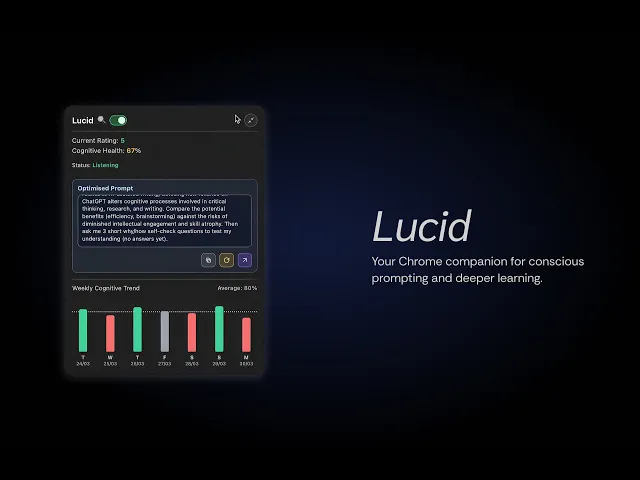
A real-time cognitive agency heads-up display (HUD) designed to cultivate active learning and critical analysis when using AI as a learning companion. Powered by local, on-device Chrome AI to ensure zero latency and complete data privacy, Lucid evaluates prompts across key learning rubrics and reframes passive queries into deeper, collaborative thinking loops. It was a 1-week school project.
Solo
Travis Tan
Scope
Vibe-coding
UI Design
Time
2026
1 week

Disconnect in learning
When I ask LLMs straightforward questions, I'm often flooded with extensive information that results in very little genuine retention. Reflecting on my personal experiences, I found two main issues.
1) Non-specific prompts
Prompts from everyday users are often broad and underspecified. This leads LLMs to return overwhelming walls of generic text that offer little real depth and focus.
2) No understanding checks
Without built-in checkpoints, users rarely test their understanding of the generated output. Receiving polished answers they couldn't otherwise generate gift the users a sense of satisfaction that doesn't translate to real comprehension.
Prompting for deeper learning
Fast, secure, local
Lucid is powered by Gemini Nano, Chrome's native built-in AI. This means data is kept securely on your local device. It was activated in chrome://flags and updated on chrome://components.


Rating rubrics
Each prompt the user writes is rated against this rubrics, giving a score /5. The higher the score is, the better the prompt is for optimised learning. (Rating rubrics is not validated against any research due to limited project timeline)
Prompt engineered for learning
The local LLM was prompt engineered to 1) Rate the prompts 2) Optimise prompts with reference to the rubrics 3) Give 3 questions at the end of each generation to encourage users to test their understanding.
Cognitive health is added/deducted based on the prompts that users sent.

Gemini, my tutor
Gemini was my tutor for this project. As someone with zero technical background, I used Gemini to quickly find out what was possible and not possible. It was used to write a PRD for VS Code.


VS Code + Co-pilot
With a clear instructions from the PRD, I sent it to Co-pilot to build. Human intervention was definitely needed throughout the process, especially on the UX end.
Shoutout to Nigel Chan for getting me started on VS Code!
More projects